What is Satoshi
Satoshi (SAT) refers to the smallest unit of Bitcoin (BTC). One Satoshi (SAT) is equal to 0.00000001 Bitcoin (BTC), or one hundred millionth of a bitcoin.
It is named after the founder of Bitcoin, Satoshi Nakamoto.
Bitcoins that are split into these smaller units make trading Bitcoin (BTC) easier and its transactions more readable for our users.
What is a Satoshi Mode
The Bitfinex Satoshi Mode allows you to view Bitcoin in Satoshi units. When chosen, all trading pairs with BTC will be displayed in SAT units (1 SAT = 0.00000001 BTC).
For example, BTC/USD would become SAT/USD, while ETH/BTC would become ETH/SAT.
How to enable the Satoshi Mode
To enable the Bitfinex Satoshi Mode:
1. Firstly, log in to your Bitfinex account.
2. Then, go to Account > Interface > Layout.
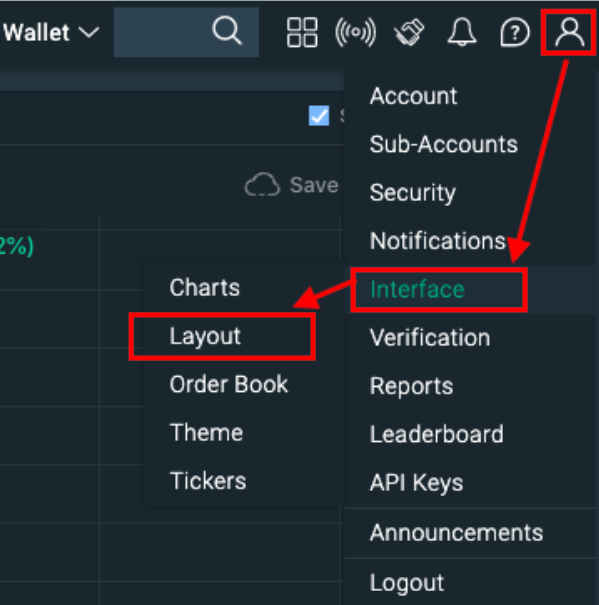
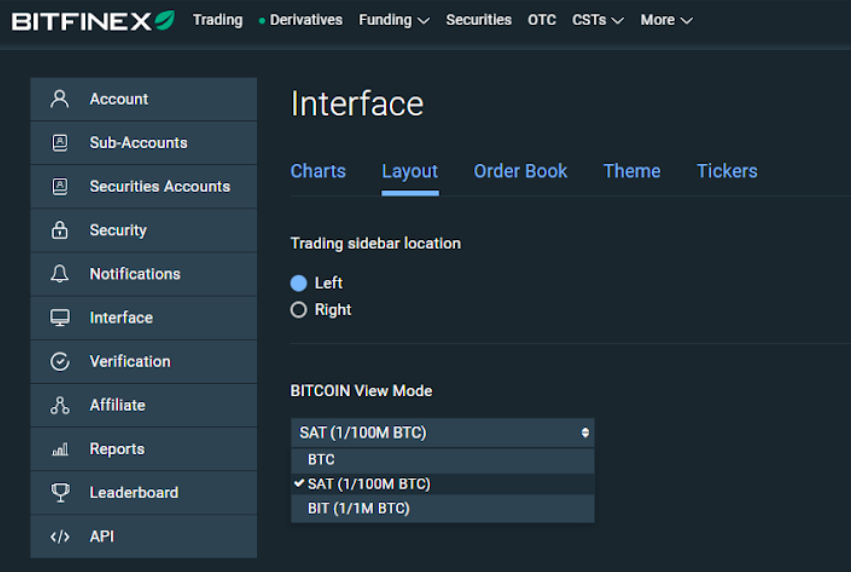
3. In Layout, choose from three types of view modes:
- BTC: Default setting
- SAT (1/100M BTC)
- BIT (1/1M BTC)
Note: The Bitfinex Satoshi Mode will be available on the Bitfinex trading page and funding page.
If you have any questions, please feel free to contact Bitfinex Support.